
Computer Aided Design (CAD): Definition, Types and Use


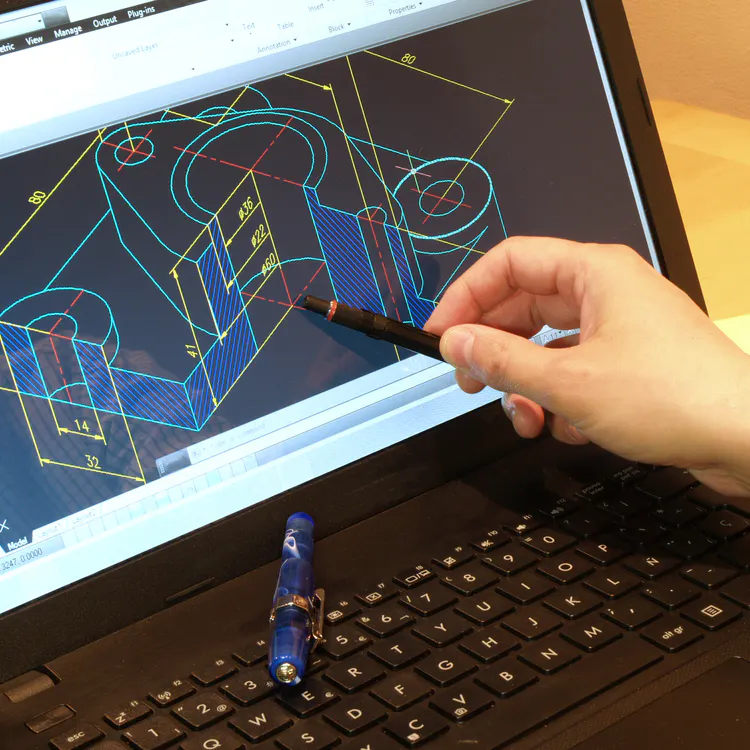
Computer Aided Design (CAD) is a technology-driven approach to creating precise digital drawings, models, and documentation across engineering, architecture, and product development industries. CAD has largely replaced manual drafting in many industries, traditional manual drafting with software-based tools that deliver higher accuracy, faster iteration, and cleaner technical outputs. The software supports a wide range of applications, from simple 2D floor plans to complex 3D mechanical assemblies, making it a foundational resource in modern design workflows.
Computer-Aided Design (CAD) has become a standard across industries where precision and documentation are non-negotiable requirements. The technology covers a broad spectrum of software types, from parametric modeling platforms to cloud-based collaborative environments, each serving a distinct design methodology. Its role spans concept development, structural analysis, and production-ready documentation, giving engineers and designers a controlled environment to validate ideas before physical manufacturing begins. The result is a significant reduction in costly design errors and faster time-to-market for finished products.
What is Computer Aided Design (CAD)?
Computer Aided Design (CAD) is software used to create precise digital drawings, 2D layouts, and 3D models that support engineering, architectural, and product design tasks. CAD has largely replaced manual drafting in many industries by introducing digital tools capable of producing exact measurements, repeatable geometry, and editable design files. A designer working with CAD operates within a digital environment where every line, dimension, and shape is defined mathematically instead of drawn by hand.
The shift to CAD-based workflows brought measurable improvements in design accuracy and production efficiency. Tolerances as tight as 0.001 inches are achievable within CAD environments, a level of precision that manual drafting does not consistently deliver. The software generates files that feed directly into manufacturing processes, removing the need for intermediary interpretation. Edits that once required complete redraws take seconds to apply digitally, cutting design cycle times by 30% to 50% in many engineering contexts. The adoption of CAD across industries reflects its capacity to reduce errors, lower costs, and accelerate the path from concept to finished product.
How Is CAD Defined in Engineering and Design Fields?
CAD is defined in engineering and design fields as the application of computer systems to create, modify, analyze, and document product designs with measurable precision. The definition covers a broad functional range, from the generation of 2D technical drawings to the construction of fully parametric 3D solid models used in structural and mechanical analysis. Simulation is typically performed using CAE (Computer-Aided Engineering) tools, often integrated with CAD platforms.
The definition extends to building documentation in architectural contexts, site planning, and construction drawing sets. It covers part modeling, assembly design, and tolerance analysis in mechanical engineering. The common thread across all fields is the use of software to replace or significantly reduce manual drafting processes. CAD-generated drawings carry embedded data, including dimensions, material callouts, and geometric constraints, that manual drawings cannot replicate at scale. The precision of CAD-defined geometry directly supports downstream processes, including CNC machining, injection molding, and 3D printing.
Is CAD an Abbreviation for Computer Aided Design?
Yes, CAD is an abbreviation for Computer Aided Design. The acronym emerged in the 1960s alongside early computational design research and has since become a globally recognized standard term across engineering, architecture, manufacturing, and industrial design disciplines.
The abbreviation is used consistently in technical literature, academic curricula, industry certification programs, and professional software naming conventions. Its widespread adoption simplifies communication across international teams, where a shared shorthand reduces ambiguity in project documentation. CAD appears in job titles (CAD Technician, CAD Engineer), software product names, and manufacturing process standards published by organizations including ANSI and ISO. The term is not interchangeable with CAM (Computer Aided Manufacturing), though the two are frequently linked in production environments. Understanding the distinction matters in technical communication, where precise terminology affects how design intent is interpreted and executed throughout the manufacturing chain.
How Does CAD Work in Design Processes?
CAD works in design processes by allowing designers and engineers to build digital representations of physical objects using specialized software tools that define geometry, dimensions, and material properties within a controlled digital workspace. The workflow begins with a blank canvas or template, where the user draws 2D profiles or constructs 3D solids by applying geometric commands, constraints, and parametric relationships. Every element created within the software is mathematically defined, meaning the model behaves predictably when dimensions change.
These analyses are typically performed using CAE modules or integrated tools within or alongside CAD platforms. Edits propagate automatically through associated drawings and assemblies when parametric modeling is active, reducing revision time significantly. Final outputs include 2D engineering drawings with full dimension sets, 3D model files compatible with manufacturing equipment, and bill-of-materials documentation. The entire process, from initial concept geometry to production-ready output, occurs within the same software environment, eliminating the translation errors that manual drafting methods introduce.
"CAD is a digital control system for design geometry, documentation, and manufacturing intent. It replaces manual drafting with mathematically defined models that can be measured, revised, simulated, and exported into production workflows. The distinction between 2D CAD, 3D CAD, parametric modeling, direct modeling, and BIM matters because each solves a different design problem, from flat drawings to mechanical assemblies and data-rich building models. In practice, CAD creates a traceable design record that supports tolerances, revisions, analysis, and manufacturing. Its integration with CNC machining, 3D printing, and simulation makes it the central link between concept and production. While CAD introduces costs, training demands, hardware requirements, and file-translation issues, it remains the foundation of modern technical work because it turns design intent into precise, editable, and manufacturable digital information."
What Happens During the CAD Design Process?
The CAD design process begins with the creation of an initial geometric model, either a 2D sketch or a 3D solid body, built using the drawing and modeling tools within the chosen software platform. The designer applies dimensions, constraints, and material assignments to define the exact behavior and appearance of the model. Refinement follows, where the geometry is adjusted, features are added or removed, and proportions are corrected based on engineering requirements or aesthetic criteria.
The software generates technical drawings that extract views, dimensions, tolerances, and notes from the 3D geometry automatically, once the model reaches the desired state. A review stage checks the drawings against design intent and industry standards before approval. The approved files are then converted into formats compatible with manufacturing equipment or shared with other teams for structural analysis. The process produces a complete documentation set, including part drawings, assembly drawings, and exported model files, that guides every subsequent production step.
Does CAD Use Digital Models for Design?
Yes, CAD uses digital models as the primary medium for design work across all major software platforms. A digital model within CAD is a mathematically defined representation of a physical object, stored as editable geometry rather than a static image or hand-drawn sketch.
The models are fully editable at any stage of the design process. A dimension change updates the geometry instantly, and associated drawings reflect the revision automatically in parametric systems. Digital models support visualization through rendered views and cross-sections, enabling designers to examine internal geometry without physical prototypes. The models are also exportable in formats (STL, STEP, IGES, DXF) compatible with CNC machines, 3D printers, and finite element analysis software. The virtual nature of CAD models eliminates the material cost of physical mockups during early design phases, reducing prototyping expenses by 40% to 70%, depending on part complexity.
What Are the Types of CAD Software Used Today?
The types of CAD software used today are shown in several entries that represent functional capabilities or deployment models, not distinct categories (e.g., parametric, cloud-based, CAM-integrated) below.
1. 2D CAD Software
2D CAD software creates flat, dimensioned drawings that define the geometry, measurements, and annotations required for technical documentation. The drawings are produced on a virtual drafting plane where lines, arcs, circles, and polygons are placed with exact coordinate precision. Output files serve as the authoritative reference for fabrication, construction, and inspection processes.
CAD systems can represent very fine precision, but achievable tolerances depend on manufacturing processes, not the CAD system itself. Layers separate different types of information (dimensions, centerlines, hidden lines, text) within a single file, keeping drawings organized and readable. Standard output formats include DXF and DWG, which are accepted by CNC cutting machines, laser cutters, and plotting equipment. Architectural firms, mechanical shops, and electrical contractors rely on 2D CAD software to produce the precise, annotated drawings that manufacturing and construction processes require. 2D CAD software remains foundational even as 3D modeling grows in use.
2. 3D CAD Software
3D CAD software constructs volumetric digital models of physical objects that define shape, size, mass properties, and surface geometry in three dimensions. The models exist in a virtual space where X, Y, and Z coordinates define every vertex, edge, and face of the geometry. Designers manipulate the model by adding features (extrusions, fillets, holes, cuts) that build up the final part geometry incrementally.
A completed 3D model carries embedded data including volume, surface area, center of gravity, and moment of inertia, all calculated automatically by the software. The model feeds directly into downstream processes: 2D drawings are extracted from it, STL files are exported for 3D printing, and STEP files are shared with manufacturing partners. Assembly environments allow multiple parts to be combined and checked for interference before production begins. Industries from aerospace to consumer electronics depend on 3D CAD software to validate designs digitally and reduce costly physical prototyping cycles.
3. Parametric CAD Software
Parametric CAD software defines geometry through a system of dimensions, constraints, and relationships that connect features to one another, so changes to one value propagate automatically through the entire model. A shaft diameter defined as a parameter updates all related hole sizes, clearance fits, and associated drawings the moment the value is edited. The approach eliminates manual rework across large assemblies with hundreds of interdependent components.
Feature history is stored in a timeline, allowing designers to return to earlier steps, modify a base feature, and see the updated geometry regenerate in sequence. The parametric approach supports design reuse, where a single master model is adapted across product families by adjusting key parameters instead of rebuilding geometry from scratch. Industries with high part variety (automotive, aerospace, industrial machinery) rely on parametric modeling to manage complex design changes efficiently. The Parametric CAD software significantly reduces revision time, but no universal percentage applies; results vary by workflow, toolchain, and complexity.
4. Direct Modeling CAD Software
Direct modeling CAD software allows designers to push, pull, move, and resize geometry directly without a constraint history or feature tree governing the changes. The approach treats the model as raw geometry that is freely manipulated at any point without needing to understand how it was originally constructed. A face is moved, an edge is rounded, and a pocket is deleted, all without navigating a parametric timeline.
The workflow suits situations where speed matters more than structured design intent, including concept development, rapid design exploration, and the repair of imported geometry that arrives without feature history. Files from different CAD platforms frequently lose their parametric data during translation, making direct modeling the practical method for editing those models. Revision cycles that require quick geometric changes benefit from the absence of constraint conflicts, which are common in heavily parametric models. The Direct Modeling CAD software is widely used in combination with parametric tools to handle both structured design work and flexible geometry editing within a single project.
5. Surface Modeling CAD Software
Surface modeling CAD software creates complex, freeform curved surfaces that define the exterior geometry of products where aerodynamics, ergonomics, and aesthetics demand shapes beyond what standard solid modeling primitives produce. The software constructs surfaces using control points, curves, and mathematical spline definitions (NURBS) that give designers precise control over curvature continuity across panels and sections.
Automotive styling studios use surface modeling to define car body panels with Class-A surface quality, where curvature transitions from hood to fender must meet strict optical reflection standards. Aerospace designers apply the same tools to wing profiles, fuselage contours, and nacelle geometries where surface accuracy affects aerodynamic performance. Consumer product designers use surface modeling for handheld devices, appliances, and furniture, where ergonomic curves must meet both functional and visual requirements. Curvature analysis tools within the software visualize deviation from target profiles, allowing designers to meet tolerances of 0.01 mm or tighter across large surface areas. The Surface Modeling CAD software bridges the gap from artistic form intent to precision engineering geometry.
What Are the Main Uses of CAD in Engineering and Design?
The main uses of CAD in Engineering and Design are listed below.
- Creating Technical Drawings and Blueprints: CAD generates dimensioned technical drawings that define part geometry, tolerances, materials, and surface finish requirements for manufacturing. A complete drawing set produced in CAD includes orthographic views, section cuts, and detail callouts that give machinists, fabricators, and inspectors an unambiguous reference. Drawing accuracy in CAD-produced blueprints supports compliance with ANSI Y14.5 and ISO 1101 geometric dimensioning and tolerancing standards.
- Designing 2D Layouts and 3D Models: CAD produces flat 2D layout drawings for planning and full 3D solid models for product visualization and analysis. Floor plan layouts for buildings, PCB board layouts for electronics, and piping diagrams for process plants are all created in 2D CAD environments. The same software transitions to 3D modeling for product design, mechanical assemblies, and structural components where volumetric geometry is required.
- Product and Mechanical Design: CAD serves as the primary environment for designing mechanical components (gears, brackets, shafts, housings) and complete product assemblies. Designers define part geometry, apply material properties, and check assembly fits within the software before any physical part is produced. Mass property calculations from the 3D model inform structural decisions and weight targets throughout the design process.
- Simulation and Analysis (Stress, Heat, Motion): CAD-integrated simulation tools apply finite element analysis (FEA) to test stress distribution, thermal behavior, and dynamic motion on digital models. A structural bracket subjected to a 500 lb load, for example, is analyzed in the software to identify stress concentrations before manufacturing. Simulation results guide geometry changes that improve part performance without requiring costly physical prototypes.
- Manufacturing Support (CNC Machining and Prototyping): CAD files are exported directly to computer-aided manufacturing (CAM) software that generates toolpaths for CNC mills, lathes, and routers. A 3D CAD model converted to an STL file feeds a 3D printer for rapid prototyping within hours of design completion. The direct connection from CAD model to machine code eliminates manual interpretation steps, reducing setup errors and shortening production lead times from days to hours in many machining environments.
Used for Creating Technical Drawings and Blueprints
CAD systems generate exact drawings that communicate design intent without ambiguity. Engineers place dimensions, tolerances, and symbols in standard formats such as ISO 128 and ASME Y14.5. The software keeps scale consistent across views like top, front, and section cuts. Designers attach notes, material specs, and revision history directly to the drawing. Teams track changes through layers and versioning, so every update stays documented and traceable.
Used for Designing 2D Layouts and 3D Models
Designers construct 2D layouts for floor plans, circuit diagrams, and piping routes with precise geometry. They build 3D models that represent real-world parts and assemblies with accurate dimensions. CAD platforms like AutoCAD and SolidWorks support parametric modeling, where one change updates related features instantly. The system renders multiple perspectives, cross-sections, and exploded views. Stability depends on model quality, constraint management, and feature dependencies; edits can cause failures in complex parametric models.
Used for Product and Mechanical Design
Engineers develop complete products by assembling individual components into functional systems. CAD tools define constraints such as alignment, rotation, and contact between parts. The software checks interference and clearance to prevent collisions in assemblies. Designers simulate real mechanisms like gears, linkages, and joints before physical production. Digital prototypes reduce trial-and-error and speed up iteration cycles.
Used for Simulation and Analysis (Stress, Heat, Motion)
Engineers run simulations directly on CAD models using methods from Finite Element Analysis. The system calculates stress distribution, thermal flow, and dynamic motion under applied conditions. Designers apply loads, boundary conditions, and material properties to test performance. The results show weak regions, deformation patterns, and failure risks. Engineers adjust geometry and materials based on data from simulation outputs.
Used for Manufacturing Support (CNC Machining and Prototyping)
CAD models connect directly to manufacturing through digital workflows. Engineers convert designs into toolpaths for CNC machines using standards like G-code. The software defines cutting paths, speeds, and tooling requirements with precision. Designers prepare files for rapid prototyping through 3D printing technologies. Manufacturing teams rely on accurate CAD data to reduce errors, material waste, and production time.
What Are Examples of Computer Aided Design in Real Projects?
Examples of Computer Aided Design in real projects are listed below.
- Architectural Building Design (Houses, Skyscrapers, Floor Plans): Architects use CAD to produce complete building documentation, including floor plans, elevations, sections, and roof layouts for residential homes and high-rise structures. A detailed floor plan for a 50-story commercial tower contains thousands of annotated elements (walls, doors, windows, stairwells, electrical symbols) all placed and dimensioned within a single coordinated CAD file. The drawings communicate construction intent to structural engineers, contractors, and building inspectors throughout the project lifecycle.
- Mechanical Parts Design (Gears, Engines, Machine Components): Mechanical engineers model individual parts (spur gears, crankshafts, bearing housings, valve bodies) in 3D CAD with exact tooth profiles, bore dimensions, and surface finish callouts. An involute gear tooth profile generated in CAD is accurate to within 0.005 mm, supporting mesh quality requirements that manual drafting does not reliably achieve. The models feed into manufacturing drawings and CNC machining programs.
- Automotive Design (Car Bodies, Chassis, Engine Systems): Automotive designers use surface modeling CAD to define exterior body panels with Class-A surface quality, while structural engineers model chassis frames and suspension geometry in solid modeling environments. A full vehicle CAD assembly contains over 30,000 individual part files linked in a managed product data environment. Crash simulation, aerodynamic analysis, and packaging studies all reference the CAD geometry before physical prototypes are built.
- Aerospace Engineering (Aircraft Wings, Fuselage Structures): Aerospace CAD models define wing airfoil profiles, spar geometry, fuselage frame spacing, and skin panel contours to tolerances measured in thousandths of an inch. A commercial aircraft wing model contains hundreds of structural components whose geometry is validated in the CAD environment against Federal Aviation Administration structural certification requirements.
- Electrical Circuit Design (PCB Layouts, Wiring Systems): Electrical CAD software places components (resistors, capacitors, ICs, connectors) on printed circuit board layouts and routes copper traces at widths from 0.1 mm to several millimeters, depending on current capacity. The completed PCB layout exports as Gerber files that go directly to board fabrication equipment.
- Civil Engineering Projects (Bridges, Roads, Drainage Systems): Civil engineers use CAD to design road alignments, bridge deck geometries, drainage networks, and site grading plans that define earthwork volumes and stormwater flow paths. A highway interchange design in CAD integrates alignment data, grade profiles, cross-sections, and drainage structures into a coordinated documentation set.
- Product Design (Furniture, Appliances, Consumer Electronics): Industrial designers model furniture joints, appliance housings, and consumer device enclosures in CAD, combining aesthetic surface modeling with structural solid geometry to meet visual and functional requirements.
- 3D Printing Models (Prototypes, Custom Parts): CAD models exported as STL or 3MF files feed directly into 3D printing slicing software, translating digital geometry into layer-by-layer build instructions for FDM, SLA, and SLS printers.
- Interior Design Layouts (Room Planning, Furniture Placement): Interior designers use 2D and 3D CAD tools to plan room layouts, place furniture to scale, and visualize spatial relationships before physical arrangements are finalized.
- Medical Device Design (Prosthetics, Implants): Biomedical engineers use CAD to model prosthetic limbs, orthopedic implants, and surgical instruments with anatomical geometry defined to tolerances as tight as 0.01 mm, meeting FDA and ISO 13485 design documentation requirements.
How are CAD Drawings Used in Construction and Manufacturing?
CAD drawings are used in construction and manufacturing as the authoritative reference documents that define what is built, how it is built, and to what specification. A set of CAD-produced architectural and structural drawings specifies wall dimensions in construction, foundation depths, steel member sizes, and connection details that every trade on the job site follows. The drawings carry dimension strings, material callouts, and detail references that eliminate interpretive ambiguity during fabrication and installation.
CAD drawings define part geometry through orthographic views, section cuts in manufacturing, and geometric dimensioning and tolerancing (GD&T) callouts that machinists and quality inspectors use as the production standard. A machined aluminum bracket drawing, for example, specifies hole diameters, thread forms, flatness tolerances, and surface roughness values that the CNC operator programs from the document. The drawing serves as the inspection reference, allowing quality teams to verify finished parts against the original design intent. Without CAD-produced drawings, production consistency across multiple machines, shifts, and supplier facilities is difficult to maintain.
Are CAD Drawings Required for Production?
Yes, CAD drawings are required in many industries and workflows, but some modern manufacturing environments use 3D model-based definitions (MBD) instead of traditional drawings. Drawings provide the detailed technical instructions that operators, machinists, and fabricators need to produce parts and structures that meet design specifications consistently across multiple production runs.
These standards require controlled design documentation and traceability, but documentation may include drawings, digital models, specifications, or other controlled records. In commercial construction, building permits require stamped CAD-produced drawings submitted to local authorities before work begins. A purchase order without a drawing or model file lacks the dimensional and material data needed to quote, set up machines, or inspect finished parts in contract manufacturing. Verbal descriptions and sketches fail to convey the tolerances, surface finishes, and material specifications in precision manufacturing. CAD drawings close that gap by encoding design intent in a universally readable technical format accepted across industries and international supply chains.
How Does Revit compare to AutoCAD in CAD Workflows?
Revit, compared to AutoCAD in CAD Workflows shows a clear difference in how each system handles design, data, and coordination. Revit focuses on building information modeling while AutoCAD focuses on drafting and documentation, and the two platforms serve fundamentally different workflow structures despite both carrying the CAD classification. Revit constructs an intelligent 3D building model where walls, floors, roofs, and structural members are data-rich objects that carry properties (material, thickness, fire rating, cost) beyond simple geometry. AutoCAD, by contrast, produces drawings composed of lines, arcs, and text that communicate design intent without the embedded data layer that Revit maintains.
The practical difference affects how teams work and how information flows across a project. A change made to a wall in Revit updates the floor plan, section, elevation, and schedule simultaneously because all views derive from a single model. The same change in AutoCAD requires manual updates across each affected drawing sheet. For multi-discipline building projects where architecture, structure, and mechanical systems must coordinate, the data-driven model approach that distinguishes Revit® Vs. AutoCAD® determines which platform better fits the project's collaboration and documentation requirements.
What Makes Revit Different From AutoCAD in Design Use?
Revit differs from AutoCAD in design use by focusing on intelligent modeling instead of basic drafting. Revit creates intelligent 3D building models where every element is a parametric object with embedded data, while AutoCAD creates drawings composed of geometric entities without the same level of embedded building information. A wall placed in Revit knows its height, material, thermal resistance, and structural load-bearing status. A wall drawn in AutoCAD is a pair of parallel lines with no inherent knowledge of what it represents in the physical building.
The difference extends to how each platform handles design updates. Revit's model-based approach means that a floor-to-floor height change propagates to all walls, stairs, sections, and schedules automatically. AutoCAD requires the designer to locate and update each affected drawing element individually, a process that introduces error risk on complex projects. Revit's approach suits the BIM workflow standard adopted by major construction firms and project owners, while AutoCAD remains the preferred tool for detailed 2D drafting, shop drawing production, and projects where a full BIM model is not required.
Is Revit Better for Building Information Modeling?
Yes, Revit is a more capable platform for building information modeling. The software was built specifically around the BIM (Building Information Modeling) methodology, where a single federated model carries architectural, structural, and MEP (mechanical, electrical, plumbing) data that all project disciplines reference and coordinate within the same environment.
Revit's BIM capabilities include clash detection, which identifies physical conflicts from two building systems occupying the same space before construction begins. Quantity takeoff tools extract material volumes and counts directly from the model, supporting cost estimation and procurement. The software supports the IFC (Industry Foundation Classes) open standard for BIM data exchange, allowing Revit models to share data with structural analysis software, energy simulation tools, and facility management platforms. The clash detection and coordination capabilities of a Revit BIM model deliver measurable value compared to a disconnected set of AutoCAD drawings on large commercial projects, where coordination errors carry costs measured in hundreds of thousands of dollars.
How Does AutoCAD Compare to SolidWorks in CAD Applications?
AutoCAD compares to SolidWorks in CAD Applications through differences in modeling approach, design intent, and engineering focus. AutoCAD also supports 3D modeling and parametric constraints, though its core workflow remains drafting-centric, while SolidWorks is used for 3D parametric mechanical design, and the distinction reflects a fundamental difference in the types of design problems each platform is built to solve. AutoCAD's strength lies in producing precise 2D drawings for architecture, civil engineering, and electrical documentation, where flat plans and schematics are the primary deliverables. SolidWorks builds fully parametric 3D solid models where part geometry, assembly relationships, and engineering simulations are the focus.
The two platforms rarely compete for the same task in practice. A mechanical engineering firm designs parts and assemblies in SolidWorks and may import 2D manufacturing drawings into AutoCAD for annotation or layout work. An architectural firm uses AutoCAD for construction document production without needing the 3D solid modeling capabilities SolidWorks provides. Choosing from these platforms depends on whether the primary output is a 2D drawing set or a 3D parametric model, and the difference is reflected in the distinct workflows that AutoCAD® vs. Solidworks® comparison analyses consistently identify.
When Should You Use AutoCAD Instead of SolidWorks?
AutoCAD is the appropriate choice when the primary deliverable is a 2D drawing, schematic, or layout rather than a 3D parametric model. Architectural floor plans, electrical wiring diagrams, site plans, piping and instrumentation diagrams (P&IDs), and civil road layout drawings are all produced efficiently in AutoCAD because the workflow centers on placing and annotating 2D geometry instead of constructing solid bodies.
AutoCAD suits projects where imported geometry from multiple sources needs to be combined in a common drawing environment without the overhead of managing parametric feature histories. It is the preferred platform when collaborating with trades or clients whose workflows are built around DWG file exchange, a format that AutoCAD established as the industry standard for 2D drawing data. SolidWorks becomes the better choice when the project requires 3D part modeling, assembly constraint management, or integrated FEA simulation. AutoCAD delivers faster, more direct results for projects requiring only dimensioned 2D documentation without 3D geometry.
Is SolidWorks Better for 3D Modeling Tasks?
Yes, SolidWorks is the stronger platform for 3D modeling tasks in mechanical and product design contexts. The software provides a comprehensive parametric solid modeling environment where parts are built using feature-based history (extrusions, revolves, sweeps, lofts, fillets) that update automatically when base dimensions change.
SolidWorks assembly modeling allows hundreds of parts to be mated and constrained in a virtual environment, with interference detection identifying collisions between components before physical production. Integrated simulation tools (SolidWorks Simulation) apply FEA to test stress, displacement, and safety factors on parts under defined load conditions, providing engineering data that informs geometry decisions before manufacturing begins. Sheet metal tools flatten 3D formed parts into flat patterns for laser cutting or stamping, and mold design tools create cavity and core geometry for injection molding tooling. SolidWorks provides a depth of capability that 2D-focused platforms do not match for mechanical design work requiring 3D geometry, assembly validation, and engineering analysis.
How does CAD Support 3D Printing and Additive Manufacturing?
CAD supports 3D printing and additive manufacturing by providing the precise digital geometry that additive manufacturing equipment requires to build physical objects layer by layer. A 3D CAD model defines the complete exterior and interior geometry of a part, including wall thicknesses, internal channels, and fine surface details, with the accuracy that printing hardware needs to produce dimensionally correct output. Most engineering additive workflows begin with CAD, but printable geometry can also originate from 3D scanning, topology optimization, or mesh sculpting tools.
The CAD-to-print workflow begins with exporting the finished model as an STL or 3MF file, which converts smooth CAD geometry into a triangulated mesh that the slicing software reads. The slicer translates the mesh into layer-by-layer toolpaths at resolutions from 0.05 mm to 0.3 mm, depending on the printing technology and material. The direct digital workflow from CAD model to printed part, without intermediate machining or tooling steps, is the defining feature of 3D Printing as a manufacturing method that CAD enables from first geometry to finished component.
How Are CAD Models Used in 3D Printing Processes?
CAD models are used in 3D printing processes as the source geometry that defines every dimension, surface, and internal feature of the part to be printed. The model is created in CAD software with standard solid modeling tools, then exported as an STL file that represents the geometry as a mesh of triangular facets. The facet resolution controls how closely the exported mesh approximates the original smooth CAD geometry, with finer tessellation settings reducing visible facet artifacts on curved surfaces.
Slicing software reads the STL file and divides the geometry into horizontal cross-sections at the layer thickness set for the print job. Each cross-section becomes a toolpath that the printer follows to deposit material, cure resin, or sinter powder. Features defined in the CAD model (holes, threads, bosses, undercuts) must meet the minimum feature size requirements of the selected printing process, which range from 0.2 mm for FDM to 0.05 mm for SLA. Dimensional accuracy from CAD model to printed part typically falls in the range of 0.1 mm to 0.5 mm, depending on machine calibration and material shrinkage.
Is 3D Printing the Same As Additive Manufacturing?
Yes, 3D printing is a form of additive manufacturing, and the two terms are frequently used interchangeably in both technical and commercial contexts. Additive manufacturing is the broader category that describes any process where a part is built by adding material layer by layer, as opposed to subtractive processes like milling or turning that remove material from a solid block.
“3D printing” is commonly used broadly for additive manufacturing processes, including powder-bed and photopolymer systems—not just deposition-based methods and the equipment used to execute it. Additive manufacturing encompasses a wider range of technologies, including FDM (Fused Deposition Modeling), SLA (Stereolithography), SLS (Selective Laser Sintering), DMLS (Direct Metal Laser Sintering), and binder jetting, all of which qualify as additive processes. The shared principle across all additive manufacturing methods is that material is added selectively at defined coordinates derived from a CAD model, building up geometry from nothing to a finished part without the need for molds or cutting tools.
What Are the Benefits and Limitations of CAD Software?
The benefits and limitations of CAD Software are listed below.
- Precision and Accuracy: CAD software produces drawings and models with dimensional accuracy that manual drafting does not consistently achieve. Tolerances of 0.001 inches are standard in CAD-generated outputs, and mathematical geometry definitions reduce drafting and transcription errors but do not eliminate all modeling or interpretation errors that accumulate in hand-drawn work. Manufacturing processes, including CNC machining and injection molding, depend on its precision to produce parts that meet specifications on the first production run.
- Design Speed and Efficiency: Parametric CAD systems update associated drawings, assemblies, and documentation automatically when a single dimension changes, eliminating the manual rework that consumed significant time in pre-digital design workflows. Design cycle times in CAD-based engineering departments are 30% to 50% shorter than equivalent manual drafting processes, according to industry benchmarks across mechanical and architectural design sectors.
- Reusability and Standardization: CAD files are reusable across multiple projects, and standard part libraries reduce the time required to source and model frequently used components. A fastener library containing thousands of standard bolts, screws, and washers is inserted into assemblies in seconds, and company-standard title blocks, drawing templates, and layer configurations enforce consistency across an entire design department.
- Simulation and Validation: Integrated analysis tools within CAD software test structural integrity, thermal behavior, and fluid flow on digital models before physical prototypes are built. FEA simulations identify stress concentrations and failure points at loads from 1 lb to hundreds of thousands of pounds, allowing geometry changes to be made digitally at a fraction of the cost of physical testing.
- High Learning Curve: CAD software requires substantial training time before a user reaches productive proficiency. Professional-level competency in parametric modeling platforms typically requires 6 to 18 months of dedicated practice, and advanced capabilities like FEA simulation, surface modeling, and mold design add additional learning time measured in months to years.
- Software and Hardware Cost: Professional CAD licenses range from [$1,500 to $10,000] per seat annually for mainstream platforms, with high-end aerospace and automotive tools carrying higher costs. Hardware requirements for 3D CAD include workstation-grade graphics cards and processors, with suitable systems priced from [$2,000 to $8,000] per workstation. Cloud-based CAD subscriptions reduce upfront hardware costs but introduce ongoing subscription expenses from [$300 to $2,500] per user annually.
- File Compatibility Challenges: CAD files created in one platform do not always translate cleanly into another, and geometry loss or feature simplification during file conversion introduces errors that require manual correction. Translation formats (STEP, IGES, ACIS) preserve geometry but discard parametric history, limiting the editability of imported files in receiving software.
Summary
This article presented CAD modeling, explained it, and discussed its various types and examples. To learn more about CAD modeling, contact a Xometry representative.
Xometry provides a wide range of manufacturing capabilities, including the ability to order 3D printed parts and other value-added services for all of your prototyping and production needs. Visit our website to learn more or to request a free, no-obligation quote.
Copyright and Trademark Notices
- AutoCAD®, Autodesk®, Inventor®, and Tinkercad® are registered trademarks of Autodesk, Inc., and/or its subsidiaries and/or affiliates, in the United States.
- SolidWorks® is a registered trademark of Dassault Systèmes SolidWorks Corp.
- ANVIL-4000® is a registered trademark of Manufacturing and Consulting Services, Inc.
- ADAM™ is a trademark of Manufacturing and Consulting Services, Inc
Disclaimer
The content appearing on this webpage is for informational purposes only. Xometry makes no representation or warranty of any kind, be it expressed or implied, as to the accuracy, completeness, or validity of the information. Any performance parameters, geometric tolerances, specific design features, quality and types of materials, or processes should not be inferred to represent what will be delivered by third-party suppliers or manufacturers through Xometry’s network. Buyers seeking quotes for parts are responsible for defining the specific requirements for those parts. Please refer to our terms and conditions for more information.