How to Optimize Your Xometry Profile for More Visibility


Xometry helps its manufacturing Partners turn open capacity into revenue by matching shops’ capabilities and certifications to the best-fit jobs, from rapid prototypes to mass production. Your shop’s profile is the key that unlocks all of your potential jobs. Read on to learn how your profile determines which jobs you see on your Job Board, how to complete your profile, and how certain elements can boost your visibility to Xometry’s internal matching algorithm and high-value RFQ opportunities.
Why Your Profile Determines Job Matching
Access to a consistent flow of pre-matched jobs is one of the top reasons to be a Xometry Manufacturing Partner. After a Xometry customer places an order, that job appears on the Job Board for Partners that meet the manufacturing, certification, and inspection requirements. An incomplete or outdated profile directly limits which jobs a Partner is eligible for, and what they see on their Job Board.
“Having an incomplete profile reduces the potential number of job offers a Partner can receive,” said Kacey Bennett, partner engagement manager at Xometry. “Adding all of their certifications and processes to their profile allows Partners to receive more specialized offers that maximize their shop capacity. If they don’t list a capability on their profile, they won’t get matched with a job that requires it.”
Complete Your Shop Capabilities Profile
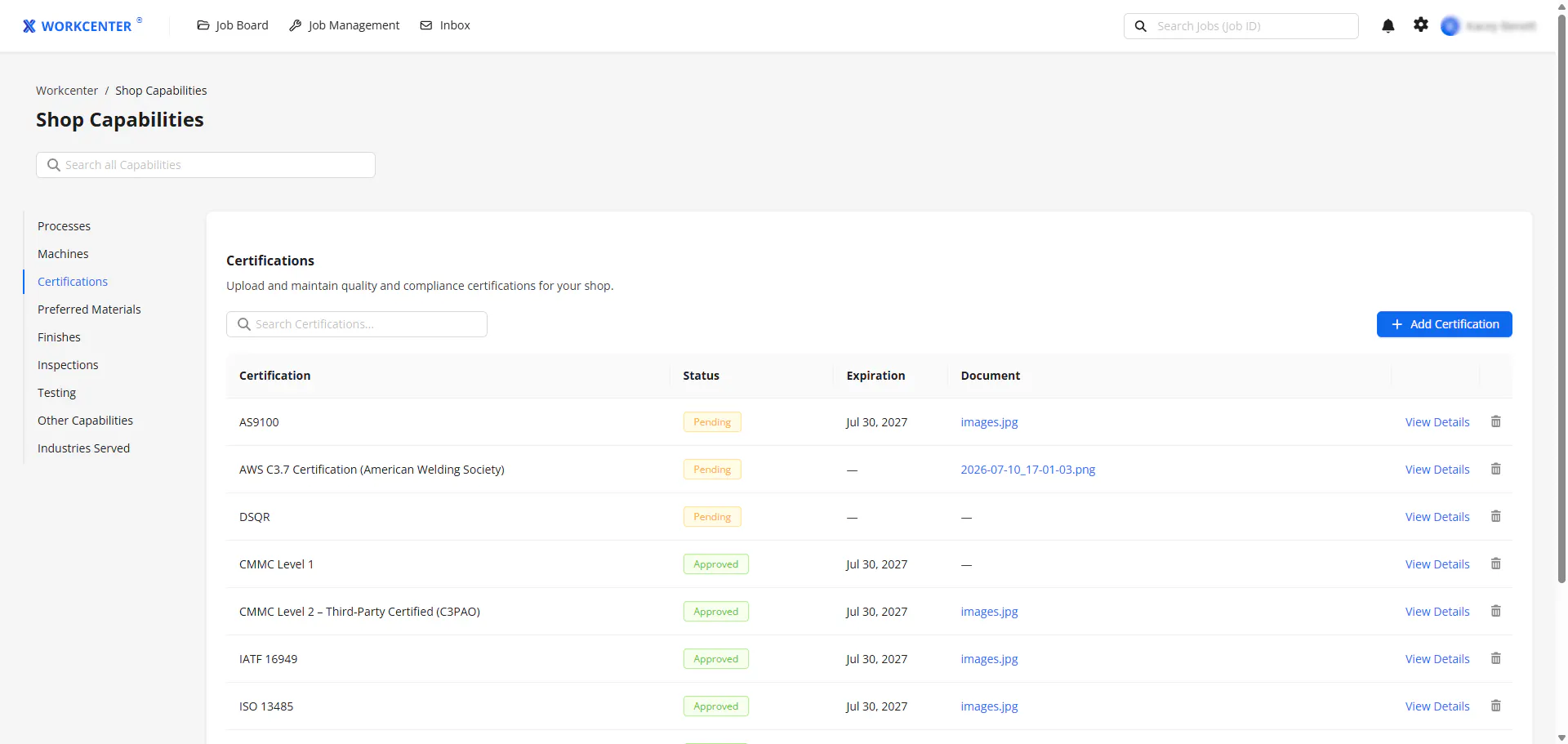
To complete or update your shop profile, log in to Workcenter and click the gear icon in the upper-right corner. Select Shop Capabilities, and from there you can add or update the following capabilities.
- Processes: Which processes is your shop equipped to handle? Xometry offers customers more than 21 processes —the more capabilities your shop has, the more jobs you’ll be eligible for.
- Subprocesses: Make sure you go into as much detail as possible when adding processes to your profile. Don’t forget to add subprocesses such as roll forming for sheet metal and grinding for CNC machining.
- Materials: Xometry customers can choose from more than 200+ materials when ordering custom parts. Listing all the materials your shop can process makes your profile better reflect your capabilities, but you’ll still be able to view jobs that might include materials that aren’t listed on your profile.
- Machines: Machines are the heart of your shop — make sure you add them to your shop profile! Updating your profile when you add a new machine to your shop ensures that you can get a return on your investment by filling open capacity and putting that machine to work.
Certifications
Certifications give customers confidence that Xometry Partners can handle the demands of their specific industries, from aerospace and defense to automotive and medical. Having in-demand certifications can elevate your shop to a higher tier in the Xometry Manufacturing Partner Network, making you eligible for higher-value jobs.
On average, certified shops earn 6x more than shops without certifications. Certified Partners experience a significant increase in both the number of job offers and average job value.
Adding your certifications to your profile is simple — just upload your certificates, and a member of the Xometry Partner team will validate and approve them. You’ll get a reminder to update your certifications before they need to be renewed, so you don’t lose out on any jobs because of an expired certification.
First/Formal Inspection Training
Completing a First Article Inspection Report or a Formal Inspection Report is another way to build customer confidence and make your shop eligible for more high-level jobs. These forms will be available on your Job Board if a job requires them. If you need any guidance for filling them out, check out this article or join Xometry’s Quality Support Hour, hosted Monday through Friday from 3:00–4:00 pm ET.
QMS in a Box
QMS certifications are the gold standard for documenting security and compliance, but if your shop doesn’t have a certain certification, you can still qualify for Xometry jobs. To support our Partners who are not third-party accredited and wish to align with Xometry’s requirements for accessing more complex work, Xometry offers comprehensive quality management system (QMS) guidance and templates — a starter “QMS in a box.” This guide can help you establish a QMS foundation or enhance your existing QMS to meet Xometry’s expectations. Based on the level completed, you may qualify for a higher tier and will become eligible for higher-value jobs.
Partner Success Score and Outsourcing Tier Eligibility
When you log in to Workcenter, your dashboard automatically displays your up-to-date Partner Success Score (PSS). Your PSS is based on all activities in the last 90 days or the last 20 jobs, whichever represents the most job volume. The quality and timeliness of your work determine your score, and a higher score opens you up to a higher volume of Xometry jobs. Maintaining a high PSS makes you eligible for a higher job volume, so if something looks off with your score, you can request a review in Workcenter through the Scorecard page by clicking “Request Review” next to any of the jobs impacting your score. Learn more about your PSS score here.
A complete, up-to-date shop profile is your most powerful tool for getting access to pre-matched Xometry jobs — it determines which jobs reach your Job Board and how much of your capacity gets put to work. Take a few minutes today to review your processes, materials, machines, and certifications in Workcenter, and start seeing the results on your Job Board.